Overview#
AirControl is a tool to control PC with gestures, based on Google MediaPipe and Intel MiDaS.
Supported gestures#
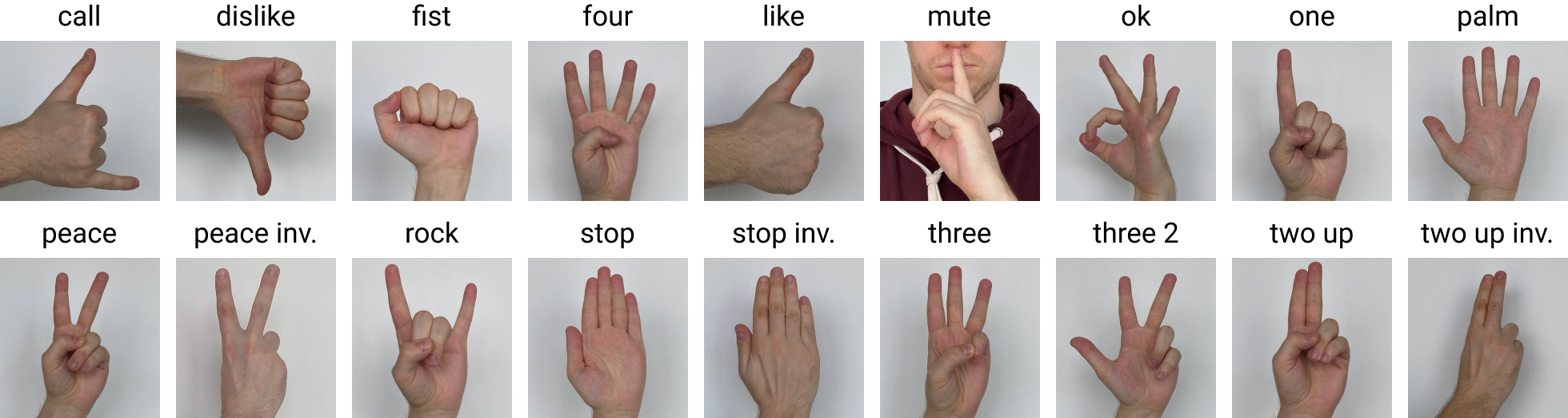 The gestures available are some of the ones provided in the HaGRID dataset (shown in the picture): “fist”, “four”, “one”, “palm”, “peace” and “three 2”.
If you want to retrain MediaPipe and add more gestures, see the notebook mediapipe_fine_tuning.
Improving recognition with MiDaS#
Gesture recognition can be disturbed by objects and light reflection in the background of the scene captured by the webcam. To make the task easier, the depth mask predicted by MiDaS has been leveraged; for every frame:
A depth mask is obtained and scaled from 0 to 1 (where 0 means far from the cam objective).
The mask is multiplied by the original frame so that every far element becomes darker.
This procedure is based on the reasonable assumption that the user will always be near the webcam when he makes the gestures.
Customise actions and programs#
The logic behind the tool is simple: every gesture is mapped to a pyautogui function, which is called when the gesture is recognised.
def screen_capture():
    """
    Open screenshot tool
    """
    pyautogui.hotkey("win", "shift", "s")
A gesture can also be mapped to a different function based on the active program; for example, “one” corresponds to “jump to the search bar” if you are on a generic Chrome web page, “make video full screen” if the active Chrome tab is on YouTube, and “open starred emails” if on Gmail. Specific websites or programs can be specified by adding keys to the dictionary stored in params.py. If the active program is not stored in the dictionary, “General” functions are called by default.
Different functions can also be mapped to different positions of the gesture; for example, if “palm” is at the center of the screen, a screenshot is taken, while if it is at the right of the user, the window is split to the right side of the screen.
window_aware_gestures = {
    "General": {
        "one": voice_type,
        "peace": notifications_center,
        "three2": file_explorer,
        "four": settings,
        "palm": {"Right": split_right, "Center": screen_capture, "Left": split_left},
        "fist": multi_task,
    },
    "Google Chrome": {
        "YouTube": {"one": full_screen, "peace": next_video},
        "Gmail": {"one": open_starred, "peace": new_mail},
        "one": search_bar,
        "peace": find_in_page,
        "three2": new_tab,
        "four": close_tab,
    },
}